1. Introduction
This guidance explains how to access and use the questions in Culture Counts that were developed as part of the Linguistically Easy Read (LER) Project. These questions were first made available to users of the Impact & Insight Toolkit Project 23+ in February 2026.
For further information about the LER project that brought about these updates, please see our associated blogpost and/or report.
To be fully Easy Read, text needs to be in a large font and accompanied by an image; this is currently not possible in the Culture Counts platform. Therefore, the language of the questions in the platform is accessible, but the presentation of the questions is not fully easy read. This is why we refer to the questions as ‘linguistically Easy Read’.
That said, we can offer fully Easy Read paper surveys, which you can find more details about later in this guidance.
2. Templates
When you create a new evaluation, you will find a linguistically Easy Read version of each of our standard templates in the dropdown list of options.
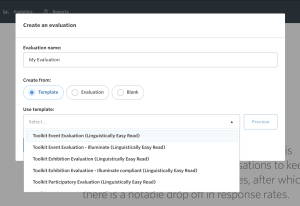
As always, the exact templates you have access to will depend on factors such as your funding status with Arts Council England; this is to streamline your experience as much as possible. Therefore, your available templates may look slightly different to those in this screenshot.
In the public survey of the linguistically Easy Read templates, any dimension or Question Bank question in the original template that has a linguistically Easy Read version available will have been replaced by the LER question.
Note – Not all questions will be LER if you choose an Illuminate-compliant template. This is because we need to ensure that the Illuminate questions align exactly with those included in the Illuminate system.
3. Dimensions
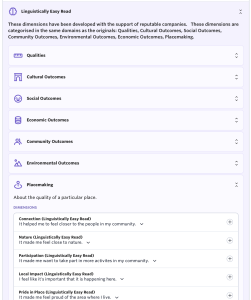
You now have the option of using a linguistically Easy Read version of a dimension, except for a limited number of original dimensions that have been archived due to ambiguity or merged concepts.
The LER dimensions are labelled as such, e.g.

In the Culture Counts platform, all dimensions, including LER, will continue to be found via the Design page of your surveys.
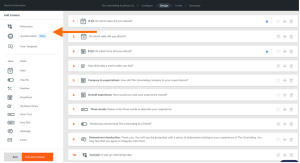
They are also available in the Dimensions Library section of the platform, where you can include them in your dimension lists.
4. Dimension Lists
Dimension lists enable you to store your favourite dimensions in one place and insert them into your evaluations in one swoop, meaning that you don’t need to add them individually.
If you want to keep your choice of dimensions the same, but use their LER versions, you need to create a new list.
Tip: We recommend you label it ‘Easy Read’ (or similar!) to avoid confusion when creating your new evaluations.
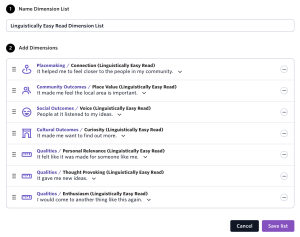
See here the guidance on creating dimension lists.
So, if you were going to create an LER evaluation using the pre-existing templates, you would do the following:
- Create a new evaluation
- Select the appropriate template labelled ‘linguistically Easy Read’
- Choose your LER dimension list (or create your LER dimension list if you don’t already have one)
- Click ‘create evaluation’
The evaluation will then load in your Culture Counts account.
5. Subject Type
In most cases, the subject of a dimension can be changed. For example, ‘It’ can be replaced by more specific values such as ‘The event’ or the title of the work you’re evaluating.
Once you have added your chosen dimension to your survey on the Design page, click on the dimension.
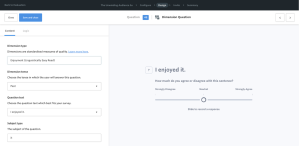
Then, change the subject of that dimension question in the ‘Subject type’ box in the question set up.
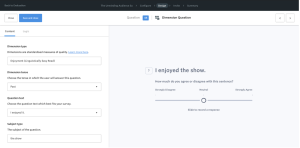
Note: The ‘Subject type’ box can appear in instances where the subject cannot be changed.
Note 2: Where available, it is important that you use the flexible ‘Subject type’ box for the survey to be considered linguistically Easy Read. The specificity provided through this flexible field is required.
5. Question Bank Questions
Many standardised questions stored in the Question Bank have LER versions. An example of an original Question Bank question and the LER version is shown in the table below:
| Original | Linguistically Easy Read |
| What is your age? | How old are you? |
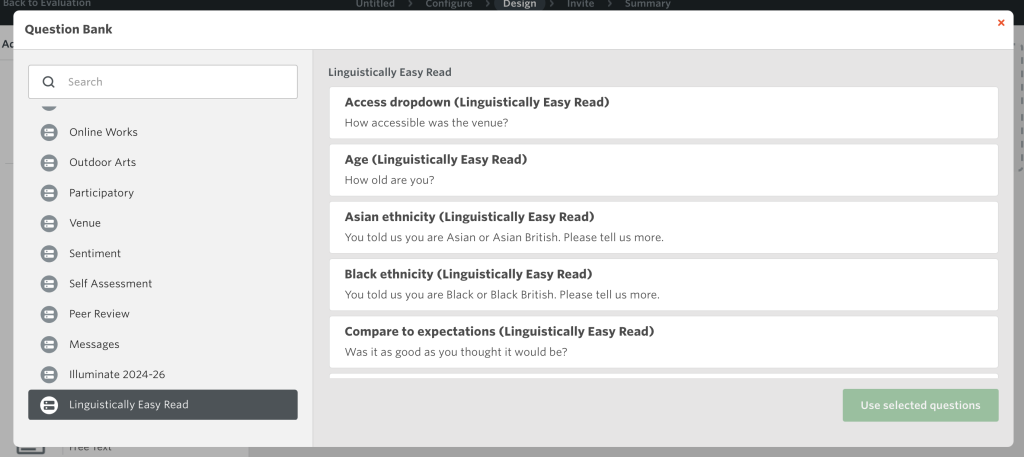
Question Bank questions that have a linguistically Easy Read version appear in the Question Bank alongside the original option. For instance, both ‘Age’ and ‘Age (Linguistically Easy Read)’ are stored in the Demographic category.

To see all LER Question Bank questions, there is a category titled ‘Linguistically Easy Read’.
6. Fully Easy Read Surveys
If you require a fully Easy Read survey (perhaps due to the primary demographic of people you work with) we can provide you with a paper survey that comes with images and will be formatted to match Easy Read requirements.
As with a regular paper survey, you will need to create the survey in the platform and then ask our support team to provide you with an Easy Read paper survey version.
Please know that you will then need to upload the data to Culture Counts, via the import feature.
See guidance on creating paper surveys here.
See an example of an Easy Read paper survey here.
Please do not hesitate to get in touch with any questions.